TIME

Showing posts with label technical updates. Show all posts

Thursday, 15 March 2012

Can the iPad 3 Screen be used in Daylight?

Apple launched a new iPad model last week that, among other things, has a retina display, a faster processor and a better camera. Now here are some still image frames grabbed from the video ad that Apple released soon after the iPad 3 announcement.

Image 1: An old man drawing something on his iPad.

1

Image 2: This man is shooting a video of his family playing on the beach.

2

Image 3: A lady is buying fruits while looking at the iPad.

3

Image 4: The family is celebrating their kid’s birthday in the garden.

4

There’s one things that’s common in all the above images. You can see people using their iPad outside in daylight even while they are on the beach.

The screen of the original iPad and that of iPad 2 is very reflective and barely visible when you are using the tablet in the open but if this video ad is any indication, those Kindle “Pool” ads would soon be irrelevant.

We’ll have to wait until March 16th when “real” users get their hands on the new iPad.

THE NEW IPAD 3 ADVERTISEMENT

COURTESY-DIGITAL INSPIRATION

Apps to Manipulate PDF Files on your iOS Device

ipad

Your iPad or the iPhone are excellent devices for reading PDF files but if you are also looking for a way to manipulate PDF documents on your iOS device itself, do check out PDF splicer.

With PDF Splicer, you can easily delete pages from a PDF document, combine multiple PDFs into one file or you can move pages from one PDF file into another using copy and paste.

The app can also be used to create PDF documents from scratch using the various images available in your Photo Gallery. While you are in the Photo Gallery app, just copy an image to the clipboard, switch to PDF Splicer and choose Insert External Clipboard Image to put that image into a PDF document.

If you have a scanned PDF file where the the orientation of images is not proper, you can easily rotate those pages in either direction using PDF Splicer and export the changes into another PDF file.

The PDF Splicer app is $4.99 but it’s currently available for free so this is something you should not miss.

Also, if you want to edit PDF files on your iPad /iPhone, an app like Good Reader may be a better choice. Here you have an option to type text directly on PDF pages, you can highlight paragraphs like a yellow marker or annotate pages using the various freehand drawing tools. This is one of my favorite apps for the iPad.

courtesy-digital inspiration

Tuesday, 6 March 2012

You Can’t Escape the Facebook News Ticker Anymore

facebook_ticker

The Facebook News Ticker displays updates from Facebook Pages that you have "liked" and activity of your Facebook friends in real time. Going forward, Facebook also plans to display ads and sponsored stories in the ticker alongside regular updates.

The news ticker is integrated with the Facebook Chat window and, until now, the ticker was only visible if your browser width was greater than 1200 pixels. If you were accessing Facebook on, say, a netbook with a small screen, the News Ticker may not be shown to you.

That seems to have changed now. If the width of your desktop screen (or the browser window) isn’t large enough to accommodate the News Ticker, it detaches itself from the Chat window and becomes part of Facebook’s right sidebar.

Monday, 20 February 2012

Cisco to challenge Microsoft Skype deal at EU court...

Cisco has said it will challenge Microsoft's $8.5bn (£5.4bn) takeover of Skype at the EU's top court.

The networking giant said conditions needed to be set to ensure Microsoft would not block other video services.
 
cisco_051011

 
In October, the European Union had ruled the deal would not impede competition.
But Cisco has called on the European Commission to introduce open standards similar to those used for mobile phones.
"Cisco does not oppose the merger, but believes the European Commission should have placed conditions that would ensure greater standards-based interoperability," Cisco's video conferencing head Martin De Beer wrote in a blog post.
European Commission spokesman Antoine Colombani said: "We will defend our decision in court."
Open standards
Skype has over 650 million users worldwide.
 
microsoft_2-300x188

 
Its takeover by Microsoft, announced in May last year, is the software giant's single biggest acquisition.
Cisco offers its own video conferencing service called WebEx. Open standards for video services would potentially allow calls to be made between WebEx and Skype, as well as other services like Google Video.
Without such a standard, Mr De Beer said Microsoft could control "the future of video communications".
"Making a video-to-video call should be as easy as dialling a phone number,'' he argued.
"Today, however, you can't make seamless video calls from one platform to another, much to the frustration of consumers and business users alike."

Saturday, 18 February 2012

Why RIM should definitely license BlackBerry 10

Forget the rumors of a RIM sale. As with all public companies, the possibility exists. But it appears that RIM is intent on digging itself out of the hole it dog for itself in the last few years. From what we’ve seen in just the last few weeks, they might be onto something. First it was the image of the first BlackBerry 10 smartphone, and then it was the images of BlackBerry 10 running. Both look pretty sharp indeed, and should convey at least a sense of confidence in RIM’s future. Yet they might not be able to go it alone. RIM could need the help of other big mobile players if they’re going to truly thrive in the new mobile environment.

BlackBerry10

That looks like a pretty usable smartphone interface. Of course, it’s just a still, and it does look a bit like BlackBerry 7. But given what we know about BlackBerry 10 — after all, it is based on the tablet OS — we could be in for something big. Add to that a number of other features, including a 3D virtual keyboard, and RIM could really knock this one out of the park. There’s just one problem, though.

They need a serious marketing push.

It’s impossible to deny the negative public perception of RIM right now, particularly in the US. The US is a huge and profitable portion of the global cellular market, and if RIM is going to turn around the BlackBerry brand it has to do so in the States. But how are they going to convince people that the BlackBerry is back for real? Having a stunning product is Step 1, and apparently RIM plans to nail down that one. They’ll need some more oomph to make a big impression, though. And that’s where licensing come in.

While RIM certainly wants to sell BlackBerry-branded handsets, seeing as they make money that way, they do stand to benefit from harnessing the power of HTC, Samsung, and other big mobile players. Those manufacturers are basically running with Android and little else. They do have influence, and they do have clout. If they put their reputation behind a new BlackBerry OS, well, it might turn around some people that RIM wouldn’t otherwise reach.

There’s no doubt that RIM loses out some in this equation, since they might be eating into their own handset sales. But remember, RIM does have other divisions. They’ll still make money on these Samsung and HTC handset sales, not only from the license, but also fromBES and BIS connections. That is, their data center services provide income that other similar companies just don’t realize. It might be enough incentive for them to go ahead with the licensing program.

If anything has become clear in the last few weeks, it’s that BlackBerry 10 has some serious potential. We’d heard the hype before, and now we’re starting to see some of the details leak out. I expect to become more impressed as the leaks grow larger. Here’s the thing, though: RIM has to execute here where they did not in the past. As the old passive line goes, mistakes were made. Now it’s time to learn from those mistakes and forge ahead. It’s not an easy battle, not with the current state of mobile in the US. But RIM appears to be positioning itself well for Blackberry 10. Licensing it to other manufacturers could prove an excellent marketing vehicle.

Learn How to Create eBooks for the iPad with this O’Reilly eBook


Apple’s iBooks Author is a free software program that lets you create eBooks with minimal effort. You can either publish your eBooks as standard PDFs, that can be read anywhere, or export them in the iBook format that can also be distributed through Apple’s iBookstore.

iBooks Author, as this video demo suggests, is like a WYSIWYG editor for eBooks. It is nowhere as complex as some of other book authoring programs (for example, Adobe Indesign) and yet you get nice professional-looking eBooks that may also have an element of interactivity.

ibooks_author

The downside is that Apple has developed iBooks Author exclusively for the Mac platform and second, eBooks created using this authoring tool can only be sold through the iBookstore. You are allowed your give away your eBook as free PDFs but you cannot sell them outside the iTunes store.

If you are fine with the various restrictions of Apple and are looking for some help to get started with iBooks Author, here’s brand new title from O’Reilly Media –Publishing with iBooks Author – that should definitely interest you.

This 94-page eBook, authored by Adam Witwer and Nellie McKesson of O’Reilly, discusses every single feature of the iBook Author app but my favorite parts are the little tips and common pitfalls that you are less likely to find in the official help manual. For instance:

1. You can ditch the Media Widget and just drag and drop an audio or video file right from Finder or the Media Browser onto a blank spot in your book, but the end result is the same.

2. If you managed to get Author working on Mac OS X Snow Leopard or earlier, you don’t get to play with the 3D chart options. These depend on the Scene Kit framework, available in OS X Lion. It may seem like you can add one, but Author slows to a crawl and your chart just looks like a garbled mess.

The eBook is available as a free download on the O’Reilly website and you can have it in either PDF, ePUB or MOBI formats depending on where you want to read that book.

Publishing eBooks with iBooks Author – Apple Demo

-by Amit Aagarwal(Digital Inspiration)

Tuesday, 14 February 2012

FBI’s Background Investigation on Steve Jobs

The FBI has released its 191 page investigation on Steve Jobs! The file consists of a background investigation that was conducted in 1991 – when Jobs was considered for an appointment to the President’s Expert Council in the Bush I White House, an advisory committee on foreign trade. The file also has records of a bomb threat against Jobs in 1985.

The issue of Steve Jobs’ character has come up on numerous occasions including his biography by Walter Isaacson. For Apple fans Steve’s tendency to be abrasive and aggressive is not something new (probably).

at1

With some other interesting facts, the report also says that there are a considerable number of people that Jobs apparently upset during the years leading up to this FBI investigation.

To create products like the iPhone and iPad, and empire like Apple is not typically done by killing everyone with kindness and constantly differing to the needs and opinions of others.  Jobs was not someone running for sainthood, he was an entrepreneur. If anyone became that popular and successful, one would get his share of the same treatment.

In the document is also mentioned Jobs previous Top Secret security clearance which is his time a Pixar and the work the company did for the NSA (1980s). The clearance was revoked then in 1990.

t1

As is usually the case with FBI investigations, Jobs probably have been asked who should be interviewed; it is interesting who was on the list. It is not clear who these quoted folks are, but if they were among the people Jobs referred the agents to then he did not know his friends very well. Given the number of derogatory comments throughout the report, it seems that Jobs’ friends at the time were not quite so friendly.

The report is available on FBI’s web site, here.

Sunday, 12 February 2012

Use Email to Convert Files into Different Formats


There exist quite a few online services that let you convert files from one format to another. You upload the source file, specify the output format and within seconds, the converted file in the desired format becomes available for download. That’s easy but there are somes limitations with this approach:

  1. When you want to convert a file, you have to upload it to the file conversion service. This is not an issue when you are converting files from the desktop but how do you upload files from iPhone, Android or any other mobile browser.
  2. Sometimes clients will send you files in obscure formats as email attachments. In order to convert those files in a format that your apps can understand, you will download the attachments to your desktop and then upload them to the file conversion service. That’s work.

Zamzar, a popular tool for converting files online, has added a new option that lets you convert files by email itself. You can forward your email attachments directly to Zamzar, without downloading them to the desktop, and they’ll be converted in no time.

c1

Convert Email attachment into Different File Formats

To get started, you need to forward the input (source) files to a specific email address like format@zamzar.comwhere format represents the file type of the desired output format.

For instance, if you have a Word document that you want to convert to PDF, you can send the file as an email attachment to pdf@zamzar.com. If you have a PDF file that you want to convert into an ebook, the corresponding conversion address would be epub@zamzar.com or mobi@zamzar.com depending on your ebook reader.

Here’s a complete list of input-output file formats that are currently supported by Zamzar. You can convert documents, presentations, ebooks, videos, audio files, archives and more.

In my test, the converted files were delivered quickly and the quality of the converted files was impressive. There’s no need to create any account at Zamzar and you can convert files up to 1 MB in a single batch. You may go for a pro account to convert bigger files that starts from $7 per month.

One more thing. You can only upload files by email and initiate the conversion process but you’ll still have to visit the Zamzar website to download the converted file. It stays on Zamzar servers for about a day and their download page is actually very confusing when accessed on a mobile phone.

KahelOS 020212 Desktop Edition out now!!!

KahelOS, the Linux distro based on Arch Linux, brings out its desktop edition. It comes with GNOME configured as the default desktop environment beforehand, a GNOME Office productivity suite,the Epiphany web browser and so many similar GNOME apps. KahelOS also maintains a rolling-release model of updating software packages using its parent's repositories like ArchLinux. This distro is in the form of a live DVD including a graphical installation program. So, what does KahelOS 020212 entail???

KahelOS

KahelOS 020212 adds new features to the earlier installer version, specially catering to advanced Linux users with a wish to have the freedom of manual partitioning the system with an added capability to resize to NTFS and Linux partitions.
It is GUI Friendly and an automatic dual-boot-with-windows option is also added for ease.

  • The other new features include
  • Updated to bluefish-2.2.1-1
  • Updated to dia-0.97.2-1
  • Updated to evolution-3.2.3-2
  • Fixed “Full Name” Issue on the User Information
  • Fixed Localization
  • Added a community-driven digital distribution service for gamers
  • Added broadcom-wl driver

For the full list of changes,see KahelOS 020212 Changelog.

Zorin OS 5.2 Ultimate released!!!

The Zorin OS Team has released Zorin OS 5.2 Ultimate, the flagship version of Zorin operating system specially made for Windows users. This release features the GNOME 2.X Classic environment in place of the Unity shell by Ubuntu. Find out what all the new release features...
z1
Zorin OS 5.2 has a variety of updates to Zorin OS 5 Ultimate which includes -security updates
  • upgraded programs
  • a brand new window border theme
  • an updated icon theme
  • an overhauled sound theme that features a fresh, new start-up sound
  • the zRam patch that improves performance under RAM-heavy workloads
Moreover,you get both 32 bit and 64 bit versions of Zorin OS 5.2 Ultimate for a nominal cost of €10 for a download and €15 for a DVD .
Know more on Zorin OS 5.2 Ultimate

Sabayon Linux 8 is here...

Sabayon Linux, the Gentoo-based distro provides the user with an easy-to-use workspace with an attractive look, perfect hardware detection and numerous updated software packages brings out its latest version yet.It is available featuring several desktops like KDE, GNOME, LXDE, Xfce and Enlightenment.

s1

Sabayon Linux 8 features

  • Faster, cleaner and more evolved than any other rolling distro out
  • Up-to-date system  while maintaining full Gentoo Portage compatibility within minutea
  • Performance focussed with GCC 4.6 with Graphite Loop Transformation infrastructure and Link Time Optimizations enabled
  • Upadted to Linux Kernel 3.2
  • Offers additional Server-oriented Linux kernels like OpenVZ, Vserver, Generic Server
  • Natively supports the btrfs filesystem besides ext4, aufs, and others

Read the complete Sabayon 8 Changelog..

Easily Monitor System Resources in Ubuntu With Indicator-Multiload

Do you like to keep an eye on system resource usage in Ubuntu?

Like many people I only tend to do so when my desktop is grinding to a halt because of a misbehaving app. Because of this I’m sometimes too impatient late to gracefully rectify the situation; my desktop becomes so unresponsive that nothing short of a hard reboot is required inorder to solve the screw up in a timely fashion.

But maybe if I kept a cautious eye on hardware usage I would spot rogue apps before they got out of hand. Perhaps by using something like Indicator Multiload: -

u

Features

By default only one graph - Processor - is displayed. If you’re using a multi-core CPU do note that it graphs usage on an ‘overall’ basis rather than per-core. Clicking on this graph displays a menu with more detailed data on other aspects of your system, such as memory, swap, network usage, etc.

The Preferences pane lets you fully configure what parts of your hardware are monitored, how often, and which graphs are displayed on the panel. If you’re a stickler for detail you can also adjust the colours used on the graphs themselves, though I find the default settings to be more than adequate.

Install

Indicator Multiload is available to install in Ubuntu 11.04, 11.10 and 12.04 via the following PPA: -

  • sudo add-apt-repository ppa:indicator-multiload/stable-daily
  • sudo apt-get update && sudo apt-get install indicator-multiload

After installation open the Dash and search ‘Indicator Multiload‘ to launch it.

Wednesday, 8 February 2012

IPFire 2.11 Core 56 and PCLinuxOS KDE 2012.02 ISO Released

IPFire is a Linux distro which promises easy installation, nice handling capability and a high level of security. It operates through an intuitive web-based interface that is offered for beginners and professionals. It is maintained by developers concerned about security. Know more about the 2 releases...

Core Update 56 for IPFire 2.11 has been released. It is mainly a bug-fix  and security update.

IPFire

The new features include

  • Images that automatically scale up the partitions at first boot. 
  • Fixed baud rate on flash images
  • Reloads static routes after connecting to the internet.
  • Allows “:” character in configuration settings
  • Fixed changing passwords of proxy users.
  • Fixed block device detection for graphs and other scripts
  • Fixed starting/stopping errors in the openvpn-control binary for net-to-net connections

PCLinuxOS KDE and KDE-MiniME 2012.02 have been released. These are 32 bit quarterly update isos that can also be installed on 64 bit computers.

pclinuxoskde

The new update features

  • Kernel 2.6.38.8bfs kernel for maximum desktop performance.
  • Full KDE 4.6.5 Desktop
  • Nvidia and ATI fglrx driver support
  • Multimedia playback support for many popular formats
  • Wireless support for many network devices
  • Printer support for many local and networked printer devices

Know more about IPFire 2.11 Core 56 and PCLinuxOS KDE 2012.02 ISO Release

SalineOS 1.6 released

SalineOS is an open source Operating System that is lightweight and fast. It is built on the Debian GNU/Linux repositories. It uses Xfce as the desktop environment. Now the SalineOS 1.6 images are available for download. Know more on SalineOS 1.6.

SalineOS

This release brings SalineOS up to date with the Debian 6.0.4 release. This release features a set of Thunar custom actions & scripts to increase the functionality of the Thunar file manager to do following

  • open a directory as root,
  • open a root terminal here 
  • mark as executable 
  • run an MD5SUM 
  • convert stupid image formats (nrg mdf) to standard ISO images 
  • a simple disk usage utility and so on...

Get all the above mentioned custom actions on previous releases of SalineOS by executing the following command in a root termina(this will overwrite any Thunar custom actions that is currently set)

wget http://www.salineos.com/Scripts/customactions.run && chmod +x ./customactions.run && ./customactions.run

Know more on SalineOS 1.6

Snowlinux 2, codenamed 'Ice' is out!!!

Snowlinux is a set of Linux distros that are based on Debian's latest stable release. It has 4 different desktop environment namely, GNOME, KDE, LXDE and Xfce. It is user-friendly and has many useful tweaks and software applications.It also has an Ubuntu-based edition which features the MATE desktop.

SnowLinux

The latest release, Snowlinux 2, "Ice" has the following features

  • improved installer 
  • updated software and packages
  • improved software selection
  • better speed and response
  • all new look and feel
  • several system improvements

Learn more on Snowlinux 2

OpenShot Version 1.4.2 Released!

Another Openshot version is out. Now its the turn of version 1.4.2. This version fixes many locale and translation-related bugs. Find out what all...

o1

The highlights of this release includes

  • Fixed many critical locale-related bugs
  • Fixed reversed clips, for accurate IN and OUT points
  • Updated translations & fixed missing translations
  • Improved help manual
  • Fixed h.264 exporting for non-English languages

Sunday, 5 February 2012

The Subscriber Count of your YouTube Channel Could Go Down

Got a video channel on YouTube? You might see a drop in the subscriber count of your YouTube channel in the coming days.
Google is doing a clean-up and they’ll remove all closed and inactive YouTube accounts from the total subscriber counts . That is, if ‘zombie’ accounts have been following you on YouTube, they won’t be counted as subscribers anymore.
The YouTube team says that once the subscribe count numbers are adjusted, YouTube channel owners can expect an average drop of 4% or less. You might see a higher drop in subscriber numbers if your YouTube channel has been around for a longer period of time because you’ll have relatively more ‘closed’ accounts in your subscriber list.
To learn more about your YouTube subscribers, go to youtube.com/analytics and check the “Subscribers” link under Engagement Reports. It shows your subscriber count by geography, by date and how your various video uploads have affected, positively or negatively, your YouTube growth.

Saturday, 4 February 2012

Download and Search Music File in 16 Search Engines using Songr


There are many programs that let you search the Web and download songs. However, only few are effective in their function. Moreover, they are pricey and sometimes do not offer enough options to download music from multiple services.

If you are a music junkie or the kind of user who regularly downloads and stores the music on computer, try Songr, a freeware with an ad-free interface to search your favorite music.

Freeware to search and download music

s1

Songr lets you search for download music using around 16 search engines, right from your Windows desktop. s2

The main window of the program, along with simple and minimalist interface offers a dedicated search aggregator for MP3 songs. All a user need to do is enter a keyword. The program then searches the string entered in various search engines shown in the screen-shot below.

In Songr, files are not required to be downloaded first. If you want, you can play them right away, once they have been located, right there in the search field. By simply double-clicking it, the item in the list can be played.

Alternatively, you can download the same item to a hard drive by right-clicking and selecting ‘Download’ or accessing ‘Save’ button from the top of the window. The results are invariably displayed and sorted in order of quality, thereby giving you the chance to easily download the one with best quality.

There is an additional search option in Songr, ‘Search by Lyrics’ that lets a user search for a song by typing part of its lyrics. This is really helpful for someone who remembers just part of lyrics but not the title of the song. Apart from all this, You can download HQ/HD YouTube videos and extract the audio track and even buy your favorite songs from Amazon, eMusic, Rhapsody and Zune.

s3

Songr Features:
  • Download or listen to streaming music from 16 mp3 search engines
  • Full album search
  • Automatic conversion of results to direct links to listen with your favorite media player
  • Audio extraction from YouTube videos
  • Search by lyrics: Type some words and get the name of the song and an audio preview!
  • Search by artist
  • Download HQ/HD YouTube videos and optionally extracts the audio track as mp3
  • Double clicking a mp3 file opens it directly in Windows Media Player
  • Automatic updates check, to get more search engine connectors
  • Links to buy music from Amazon and Rhapsody
  • Ad-free interface
Pros
  1. Easy to use
  2. Lets you search songs by lyrics
  3. Also downloads YouTube videos
Cons
  1. Results are not perfect always
  2. Downloads can’t be paused

Songr is very light on resources, weighs only 4.0MB and works well on Windows 7 too. Requires .NET Framework 3.5.

5 Best Free Word Processors – Comparision Chart


A Word Processor is a software that lets you type, edit, format and customize text. It can also refer to an Office application that lets you type your documents. While there are lots of word processors out there, it is difficult to choose a good one and the one which is perfect for you. To help you out, we have compared the features od some free word processors. Have a look on the comparison chart and let us know which you prefer.

Word Processors Compared

This is a comparison chart that compares 5 different free world processors and tells you about features of each word processor application. The chart is in image format, if you can’t view it properly then click on it to enlarge.

h1

OpenOffice.org

OpenOffice is an open source Office productivity suite. The suite comes bundled with a word processor, spread sheet, presentation and much more. OpenOffice was first developed and started as StarOffice and was developed by StarDivision and then it was taken over by Sun Microsystems. Click here to download OpenOffice.org.

Jarte

Jarte is a free word processing application for Windows users powered by WordPad engine. The standard version is offered free of cost, but the program is also available in Pro version. The interface and the looks of Jarte are powered by Mac OSX and it has a lot of features. Click here to download Jarte free version.

NeoOffice

All the Mac users, here is something for you, a friend of OpenOffice.org for Mac. Yes, NeoOffice is a free and open source office suite for Mac and it even looks like OpenOffice.org It was ported to Mac by Planamesa Software and it used JAVA technology to do so. It can be run on Windows by some emulation means. Click here to download NeoOffice.

AbiWord

AbiWord is yet another free and open source word processors, it was originally developed by source gear corporations and then was soon adopted by AbiSource. Then they continued with the development of AbiWord and today it is the one of the best free word processors in my opinion. Click here to download AbiWord.

Libre Office

Libre Office is one more free and open source Office suite and is a fork of OpenOffice.org. Libre Office was developed with intentions of good format support. It runs perfectly on Windows. Click here to download Libre Office.

Word Processors Comparison Poll

Please vote for your word processing software. We appreciate your vote.

What do you think is the best word processing application?

OpenOffice.org
Jarte
NeoOffice
AbiWord
Libre Office
Other:

Hope you liked our comparison chart. Comments or observations would be most welcome.

Microsoft Personal Data Dashboard lets you decide how Microsoft uses your data


Google has its Google Dashboard, which offers a view into the data associated with your Google Account and lets you change your Google Privacy Settings. Though not so well-known and exhaustive, Microsoft too offers a Personal Data Dashboard that lets you view and manage some of your online personal information and gives you options to opt out where possible.

m1

Microsoft Personal Data Dashboard

The My Profile tab in the Microsoft Personal Data Dashboard, lists down personal information about yourself, which you, yourself may have filled in while creating a Live account. If you wish you an edit and update your details here.

The My Data tab, lists your Interests, Bing searches and Microsoft newsletters which you may have subscribed too. Based on your Interests, Microsoft Advertising delivers targeted advertising to you. You can also add, delete or confirm the mentioned topics. The Bing search section lists your search keywords and the search results you clicked while signed into Bing. From the Newsletters tab, you can unsubscribe from any newsletter or subscription in this view by hovering over the newsletter and clicking unsubscribe. A nice way to centrally manage all your Microsoft newsletters.

m2

Under the My Choices tab, you can choose to opt-out of the personalized advertising experience. You can choose to not receive personalized ads on websites that use the Microsoft Advertising Platform, by not allowing it to use your information like Bing Searches, Interests and Profile. In the Microsoft Email Communications section, you can opt out of receiving email promotions or disallow sharing of your data with Microsoft Partners.

Microsoft is working on adding more services to this Personal Data Dashboard and given the heightened awareness of privacy issues now, among users, we hope that it will make the dashboard complete in all respects and very soon too!

Opt out of Microsoft Advertising

Many of Microsoft’s  Websites and online services are supported by Microsoft Advertising. To deliver targeted ads, Microsoft places a persistent cookie on your computer. Using this persistent cookie, Microsoft identifies you and delivers ads accordingly. Apart from delivering relevant ads, this information is also used to try to ensure that you do not see the same advertisements over and over again.

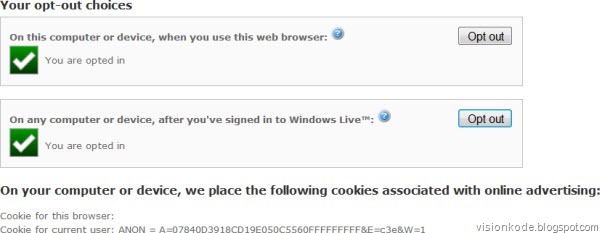
But if you want, you may opt-out of receiving targeted ads from Microsoft Advertising by visiting its opt-out page too. This page not only lets you opt out on a particular computer or browser but also from any computer even after you have signed in to Windows Live.
m3

You will also see the details of the cookie stored on your computer. Pretty transparent, in my opinion!

Incidentally, if you want to opt out from receiving interest-based advertising you can do so here. On this page, you can also find out which participating companies have currently enabled customized ads for your browser.