Friday, 3 February 2012
Opt out and maintain your privacy when using Google Services
Prevent Google from tracking your activities
Turn off search personalization
Turn off personal results
Opt out of ad personalization
Opt out of Gmail Chat History
Opt out of Google Analytics
Opt out of YouTube
Tuesday, 31 January 2012
Google Earth 6.2 Released With A New Way Of Rendering Imagery
Google Earth is an application that provides a virtual globe, map and geographical information which you can use to travel the wold virtually, see images, 3D buildings, maps and more.
Google Earth 6.2 was released a few days ago and the most important change is a new way of rendering imagery which fixes an old bug that was causing a so-called "quilt effect". This effect was caused by images and photographs taken at different times or even days (and thus, different weather conditions, etc.) and made the Earth look like a mosaic from high altitude. Here's a screenshot (before / after):
The new version also comes with improved search which now uses Autocomplete, search layers as well as biking, transit and walking directions.
Google Earth 6.2 also comes with a new feature that lets you share a screenshot of your current view through Google+, but in my test, the Google log in didn't work under Ubuntu 11.10. If you know a fix for this, please let us know in the comments!
Download Google Earth
Google Earth 6.2 for Linux was released a couple of days after the initial Google Earth 6.2 release announcement, so if you've downloaded Google Earth as soon as 6.2 was announced, redownload to get the latest 6.2 version for Linux.
Download Google Earth for Ubuntu, Debian, Fedora or openSUSE (.deb, .rpm)
For Arch Linux, you can get the latest Google Earth 6.2 via AUR.
If the font looks broken under Ubuntu (like in the above screenshot), you can fix this issue by installing the 'msttcorefonts' package:
sudo apt-get install msttcorefontsThen log out and log back in!If the font bug persists, see THIS thread on the Google Earth help forum (via chimerarevo.com).
Saturday, 28 January 2012
How Google’s New Privacy Policy Will Affect You
You’re on the way to a meeting. Traffic seems to be slowing. A text comes in: “You’re going to be late. Take the next exit for alternate route.” It’s from Google.
This is not Google’s version of Siri. It’s a result of the company’s push to use data it collects from you in novel ways that could be helpful, or unsettling.
“That’s not something I want my computer telling me. It’s creepy,” said Kurt Opsahl, senior staff attorney for the Electronic Frontier Foundation, a nonprofit digital rights advocacy organization located in San Francisco.
“Google has always collected information. That hasn’t changed,” Opsahl said. “But information that was once siloed will now be co-mingled.”
Google’s new policy replaces more than 60 existing product-specific privacy documents, for services including Gmail , YouTube and Google Docs. Google says the unified terms will provide better search results and serve up ads that are more likely to be of interest. By combining your history across products, it will have more data to work with.
Connecting the dots
Further, Google will merge data from the products you use and then analyze it to make new assumptions. That example of getting a text when you are running late is from a Jan. 26 email that Google itself sent to users. If you have an Android phone, Google already knows your location. If you keep appointments in Google Calendar, it also knows where you are trying to go. By cross-referencing that data with its traffic information service, Google can send you that alert.
Opsahl also pointed out that there are many people who have more than one Google account, such as one they use for business and one for personal communication. If data from different accounts are pooled into one Google repository with your name on it, that could cause problems.
“If Google received a warrant to disclose documents, and your business and personal docs are intermingled — that’s a problem,” he said. “Some would like to say, “No, thank you” and keep their accounts separate.”
“Google should make it easy for people to set up and manage separate accounts if they wish to do so,” Opsahl said.
Trouble ahead
While the new policy doesn’t eliminate users’ ability to set up different accounts under different names, Google intends to use data such as search history, whom you contact most frequently and your location to serve you better without regard for the partitions you may have created. “In short, we’ll treat you as a single user across all our products,” Google said.
The policy change could create problems for those who go by different names. Google’s new text reads:
“We may use the name you provide for your Google Profile across all of the services we offer that require a Google Account. In addition, we may replace past names associated with your Google Account so that you are represented consistently across all our services.”
Google+ requires real names while YouTube does not. Starting March 1, your real name could appear across Google products. If you’re hardworking accountant Jim by day and posting your Glee-inspired musical renditions on YouTube by night, you might have some explaining to do.
Take it or leave it
But Google has taken an-all-or-nothing position. “If you continue to use Google services after March 1, you’ll be doing so under the new Privacy Policy and Terms of Service. If you’d prefer to close your Google Account, you can follow the instructions in our help center,” reads Google’s FAQ page. Google says it remains committed to its data liberation policy, meaning you can request a copy of all of your data to use elsewhere when you close your Google account.
To get a glimpse of what Google knows about you, visit your Dashboard. Login to Google, go to “Account Settings,” select “Products” and then “Login to dashboard.” You’ll see a listing of the products you use and your most recent activity for each, including the last Web page you visited, your top three contacts and how many Google docs you’ve created.
Imagine the ways that data could be used — is it a “beautifully simple, intuitive user experience,” as Google says, or just plain creepy?
5SE3WWJFUY9D
Saturday, 21 January 2012
Sopa and Pipa protests not over, says Wikipedia..
After a 24-hour blackout, Wikipedia has returned to full working order but declared: "We're not done yet."
The site had blocked its content for 24 hours in protest at proposed anti-piracy legislation in the US.The encyclopaedia said the site had been viewed 162 million times, with eight million people following instructions to contact politicians.
The protest led to eight US lawmakers withdrawing their support for the proposed bills.
Two of the bill's co-sponsors, Marco Rubio from Florida and Roy Blunt from Missouri, are among those who have withdrawn their support after "legitimate concerns".
But backers of the legislation, led by the Motion Picture Association of America (MPAA), described the action as an "irresponsible" publicity "stunt".
The Stop Online Piracy Act (Sopa) and Protect Intellectual Property Act (Pipa) have caused considerable controversy among internet users and businesses since the plans were proposed in October last year.
'Melted servers'
Wednesday's co-ordinated action was intended to raise the profile of the debate to those outside of the tight-knit technology community - an objective Wikipedia said had been met.
"More than 162 million people saw our message asking if you could imagine a world without free knowledge," the site said.
Elsewhere, Facebook founder Mark Zuckerberg deemed the occasion worthy enough to post his first tweet in almost three years.
"Tell your congressmen you want them to be pro-internet," he wrote, linking to a longer statement on Facebook.
He continued: "We can't let poorly thought out laws get in the way of the internet's development.
"Facebook opposes Sopa and Pipa, and we will continue to oppose any laws that will hurt the internet."
Google, which urged its US visitors to sign a petition against the bills, said more than 4.5 million signatures had been gathered.
Advertising campaign
Supporters of the bill were quick to condemn the actions of the websites. Ex-Senator Chris Dodd, MPAA's chief executive, described the blackouts as an "abuse of power".
- Wikipedia - after the blackout
A banner advertisement was shown in New York's Times Square offering advice on "what to do during an internet blackout". It suggested reading books, listening to music or watching a movie.
News Corporation chairman Rupert Murdoch, a vocal supporter of Sopa, continued to spar with users on Twitter.
He tweeted: "Seems blogsphere has succeeded in terrorising many senators and congressmen who previously committed. Politicians all the same."
Watching closely
In the UK, the plans around Sopa and Pipa have been keenly watched, particularly by those worried about the effect the measures could have on internet companies in the country.
Peter Bradwell, a campaigner with the Open Rights Group, told the BBC: "It's explicit that [Sopa advocates] want to tackle foreign websites.
A television advertising campaign supporting the anti-piracy plans has been launched
"We're concerned about the jurisdiction that gives over the kind of things you or I do on the internet in the UK - and the power that gives US copyright holders over the things that we do here."
Mr Bradwell recounted the comments made by Ed Vaizey, Minister for Culture, Communications and Creative Industries, who in July last year said he was looking at some anti-piracy measures being discussed in the US.
"Hopefully, what the storm around this has helped do is highlight why we are so concerned about proposals for new website blocking powers.
"I hope it really helps them understand how they shouldn't make policy, and really should drive home some of the complaints that we've been making."
'Startling'
The Department for Culture, Media and Sport said it did not wish to comment on the protests, nor on the details of Sopa and Pipa.
In pictures: Sopa protests
- View a gallery of protest action taken by some of the web's highest profile websites
"Regarding UK regulation, our position is that we are completely committed to an appropriate regulatory environment that protects rights but does not stifle innovation."
The UK's "digital champion" Martha Lane Fox said the blackout technique was surprising.
"Neutrality and equality of access is one of the fundamental principles of the internet," she told the BBC.
"So (while) I understand the concern that many US companies have about the restrictive Sopa law, blackouts are a startling way to show their frustration."
Constructive debate
Echoing the statements of rights holders in the US, Richard Mollet, chairman of the Publishers Association, criticised the blacked-out websites for not engaging "constructively" in the piracy debate.
"They should say: 'OK, there's a problem with copyright infringement. We, as internet companies, have a role here. What can we do to fulfil that role and help rights holders reduce infringement?'"
Creative America posted an image on Facebook of its advertisement on display in New York's Times Square
He argued that while Wikipedia was a valued resource, it would be more noticeable to the world if rights holders were to switch off their content for a day.
"Think what you would lose.
"If you walked around the streets of America or Britain with no creative content available to you, because rights holders had decided to shut up shop, you would be deprived of the BBC, cinemas, radio, bookstores and so on.
"What's at stake when rogue internet sites are available to people and revenues are deprived is a great deal more than the excellent but nevertheless more limited Wikipedia."
Wednesday, 18 January 2012
What Are SOPA and PIPA And Why All The Fuss?
Knowing that Wikipedia would go dark for 24 hours in protest to SOPA and PIPA, I took the precaution of printing it out last night. Just kidding. Wikipedia is huge. I wanted to say just how big it is, but when I went to Googleto look up “size of Wikipedia,” most of the relevant results directed me to articles on Wikipedia which, of course, is dark for the day.
Google didn’t go dark but it did black out its logo and has a link to “Tell Congress: Please don’t censor the web!” with a link to an online petition.
What are SOPA and PIPA and why are people upset?
This is all because of two pieces of legislation: the Stop Online Piracy Act (SOPA) in the House and its Senate companion bill, the Protect IP Act (PIPA). The purpose of these bills is to make it harder for sites — especially those located outside the United States — to sell or distribute pirated copyrighted material such as movies and music as well as physical goods such as counterfeit purses and watches. Even most of SOPA and PIPA’s strongest opponents applaud the intentions of the legislation while deploring what it might actually accomplish.
Although its sponsors have said that they would amend the bill, as currently written, SOPA would enable the U.S. Attorney General to seek a court order to require “a service provider (to) take technically feasible and reasonable measures designed to prevent access by its subscribers located within the United States to the foreign infringing site.” Until this weekend, one of the ways to do that would have been to cut the DNS (domain name server) records that point to the site, but that provision is likely to be removed after the Obama administration weighed in on the issue over the weekend, saying “Any effort to combat online piracy must guard against the risk of online censorship of lawful activity and must not inhibit innovation by our dynamic businesses large and small.” The administration also echoed concerns raised by a number of security experts, including some anti-malware companies that the bill could disrupt the underlying architecture of the Internet.
The White House statement coincided with sponsors agreeing to remove the DNS blocking provisions. Still, the bill could require search engines like Google to delete any links to the sites.
These are not partisan bills. SOPA and PIPA have proponents and opponents on both sides of the aisle.
The bill would require sites to refrain from linking to any sites “dedicated to the theft of U.S. property.” It would also prevent companies from placing on the sites and block payment companies like Visa, Mastercard and Paypal from transmitting funds to the site. For more, see this blog post on Reddit.
The problem with this is that the entire site would be affected, not just that portion that is promoting the distribution of illegal material. It would be a bit like requiring the manager of a flea market to shut down the entire market because some of the merchants were selling counterfeit goods.
The bill would also cut off funding by prohibiting payment services from cooperating with infringing sites.
Opponents say it would create an “internet blacklist.”
As CBSNews.com said in its analysis, there are existing laws, including the Digital Millennium Copyright Act (DCMA) that require operators to remove specific infringing content. SOPA and PIPA would go after entire domains. Also see Declan McCullagh’s How SOPA would affect you:FAQ on CNET News.
Hollywood vs. Silicon Valley
These bills have pitted the entertainment industry against the technology industry. “Hollywood” has a legitimate interest in protecting its intellectual property. Not only are profits at stake but so are jobs. Thousands of Americans make their living by dreaming up content and selling it to the world and piracy does in fact take money out of their pockets. Silicon Valley has invested billions in creating companies that freely distribute information. While Google and every other Silicon Valley company must respect copyrights, they thrive on helping people find what they want. If, suddenly, every web site that had links to other sites had to worry that they could be in violation of the law by linking to a “banned” site, it could put undo pressure on these companies. There is also worry that SOPA and PIPA could be abused and lead to censorship for purposes other than intellectual property protection.
Are the protests having any effect?
Shutting down Wikipedia for a day or blacking out the Google logo won’t stop these bills in their tracks, but they have raised an enormous amount of awareness about the issue. As a result, it is likely that these bills will continue to be amended and, though they may pass in some fashion, they are likely to be quite different than they were when first proposed.
Monday, 9 January 2012
Introducing Android 4.0
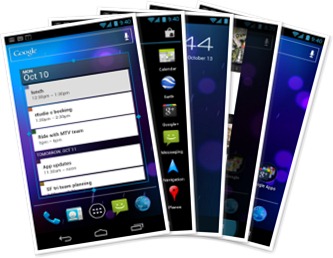
Android 4.0 (Ice Cream Sandwich) is the latest version of the Android platform for phones, tablets, and more. It builds on the things people love most about Android ? easy multitasking, rich notifications, customizable home screens, resizable widgets, and deep interactivity ? and adds powerful new ways like
Home screen folders and favorites tray
New home screen folders offer a new way for users to group their apps and shortcuts logically, just by dragging one onto another. Also, in All Apps launcher, users can now simply drag an app to get information about it or immediately uninstall it, or disable a pre-installed app.
Resizable widgets
Home screens in Android 4.0 are designed to be content-rich and customizable. Users can do much more than add shortcuts — they can embed live application content directly through interactive widgets.
New lock screen actions
The lock screens now let users do more without unlocking. From the slide lock screen, users can jump directly to the camera for a picture orpull down the notifications window to check for messages. When listening to music, users can even manage music tracks and see album art.
Improved text input and spell-checking
The soft keyboard in Android 4.0 makes text input even faster and more accurate. Error correction and word suggestion are improved through a new set of default dictionaries and more accurate heuristics for handling cases such as double-typed characters, skipped letters, and omitted spaces. Word suggestion is also improved and the suggestion strip is simplified to show only three words at a time.
Powerful voice input engine
Android 4.0 introduces a powerful new voice input engine that offers a continuous "open microphone" experience and streaming voice recognition. The new voice input engine lets users dictate the text they want, for as long as they want, using the language they want. Users can speak continously for a prolonged time, even pausing for intervals if needed, and dictate punctuation to create correct sentences.
Control over network data
Mobile devices can make extensive use of network data for streaming content, synchronizing data, downloading apps, and more. To meet the needs of users with tiered or metered data plans, Android 4.0 adds new controls for managing network data usage.
Designed for accessibility
A variety of new features greatly enhance the accessibility of Android 4.0 for blind or visually impaired users. Most important is a new explore-by-touch mode that lets users navigate without having to see the screen. Touching the screen once triggers audible feedback that identifies the UI component below; a second touch in the same component activates it with a full touch event.
Communication and sharing
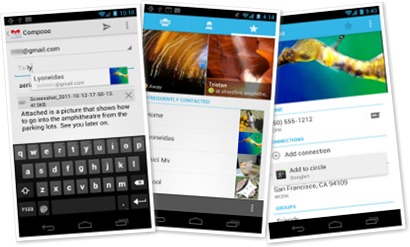
Designed for the way people live, Android 4.0 integrates rich social communication and sharing touchpoints across the system, making it easy to talk, email, text, and share.
Some changes / improvements done
Simple, Beautiful, Useful - Refined, evolved UI
Quick responses for incoming calls
Swipe to dismiss notifications, tasks, and browser tabs
Improved text input and spell-checking
Powerful voice input engine
Control over network data
Designed for accessibility
Communication and sharing
People and profiles
Unified calendar, visual voicemail
Rich and versatile camera capabilities
Redesigned Gallery app with photo editor
Live Effects for transforming video
Sharing with screenshots
Cloud-connected experience
Powerful web browsing
Improved email
Innovation etc..
Android is continuously driving innovation forward, pushing the boundaries of communication and sharing with new capabilities and interactions.
Android Beam for NFC-based sharing
Face Unlock
Wi-Fi Direct and Bluetooth HDP
Friday, 6 January 2012
Auto-Forward G-mail messages to other mail addresses…
Gmail offers an easy mail forwarding option that lets you auto-forward incoming messages to another email address. You define a rule (or filter) and any incoming mail that matches the filter is automatically forwarded to another address.
There are however some limitations in Gmail’s auto-forwarding feature:
1. You cannot auto-forward old emails. For instance, if you have a bunch of old emails that you would like to send to your EverNote or Instapaper account for archiving, you’ll have to manually forward them one-by-one as auto-forward only works for new incoming emails.
2. You cannot auto-forward to a non-verified email address. When you set up auto-forward in Gmail, it sends a verification message to the other email address before you can forward messages to that account.
Gmail Auto-Forward with Google Docs
If you would like to auto-forward Gmail messages (including the older emails) to another email address in bulk, or if you would like to forward them to another address without confirming, Google Docs can help you overcome those limitations very easily.
The trick is simple. You set up a trigger in Google Docs that watches some of the labels in your Gmail Inbox and as soon as it finds a message, it auto-forwards it to a designated email address. You just have to set it once and it then runs in the background without requiring any manual input.
Setting up Mail Forwarding – Step by Step
Create a copy of this Google Sheet in your Google Docs account and fill the columns A and B. You should put valid Gmail Label Names in column A and the corresponding auto-forward email address in column B.
Go to Tools –> Script Editor –> Triggers –> Current Script’s Trigger and Add a new Trigger. Set the Event as Time-Driven and choose either Minutes or Hours for the duration. If you want near-instant mail forwarding, set the timer to Every Minute.
Since you are running this Google Docs sheet for the first time, you’ll have to authorize it to access your Gmail account. Just follow the authorization prompts to grant Google Docs access to your Gmail.
That’s it. You can close your Google Docs sheet and it will magically forward your Gmail messages that are in particular labels. Once the message has been forwarded, the label will be removed automatically.
To quickly summarize, you set up one or more “watch” labels in Gmail and any emails that you add to these labels are automatically forward to the corresponding email addresses as you have specified in the Google Docs sheet.
This Google Docs based auto-forwarding method will work for both plain text emails as well as HTML mails that have attachments but there’s one limitation – the size of individual email messages that you are auto-forwarding should not exceed 20 KB. This is a requirement of the Google Apps Script service.
Also, mails forwarded through Google Docs will still count towards your Gmail’s daily sending limit which is around 500 messages per day.
Thursday, 5 January 2012
Access Gmail Offline with Offline Google Mail
If you suffer from frequent internet connectivity issues, which in turns affects your work with Gmail, you could now try Offline Google Mail from Google.com. This wonderful application from Gmail, lets you read your emails even without an internet connection. Let us find out how it works.
Let us take an example. You log in to your Gmail account and come across some important emails. You read a mail, need to reply urgently and all of a sudden you lose your internet connection. Now that could be frustrating! So how do you access Gmail account offline? Use Offline Google Mail or Offline Gmail!
How to install Gmail Offline
Installing Gmail Offline requires hardly any effort, just visit the Chrome store to find this application and add it to your browser.
To launch this application just click the “Apps” tab on browser default section. The application is installed on your browser as a plugin. As soon as you log in your Gmail account through this app, this client side application stores all the emails on to your PC in a temporary storage. These emails can be available for later references independent of internet connectivity.
Download: Offline Google Mail
Wednesday, 4 January 2012
Does Google Allow Ads on their Homepage?
Does Google allow ads to be displayed on their home page? The answer is obviously “no” for external advertisers but they don’t mind putting ads for their own products.
Right now, the google.com site is carrying an ad for Google Nexus, the first Android mobile phone that uses Ice Cream Sandwich or Android 4.0.
The Number of Active Google TV Users is..
There were two important developments last year that could have had a positive impact on the sales of Google TV.
First, Logitech dropped the price of their Google TV Revue box from $249 to $99 making the device much more affordable and second, the Honeycomb upgrade was rolled out that brought some popular Android Apps to your Google TV.
Logitech or Google aren’t saying how many Google TV units have they sold so far but the Android Market does offer some hints in that direction. The logic is simple.
Android Apps are now available on Google TV and some of these apps - like The Big Picture, Plex and Redux – have been developed exclusively for the Honeycomb version of Google TV. If you look at the install base of these apps (the numbers are available in the Android Market), you can get a rough idea of how popular Google TV really is?
A simple Google search - site:market.android.com intitle:google tv - reveals most of the Google TV specific apps that are currently available in the Android Market.
Some Google TV apps - like Twitter, Photos, Pandora and Napster - are factory-installed and thus there install numbers could be about the same as the total number of Google TV units that have been shipped (considering the response to Google TV, these install figures of 500k-1m are unbelievable though). Also, if you look at the 30-day install history of these apps, it is obvious that Google TV wasn’t a hit during the recent holiday season.
The other set of Google TV apps - like CNN Money, All Recipes or The Big Picture - are specific to Android 3.1 and have an installed base between 10k – 50k. This is purely unscientific but since people who have upgraded to Honeycomb are very likely to try at least one of these popular apps on their TV, my guess is the total number of active Google TV users would also be in the same 10k - 50k range.
For reference, the following chart has a big list of Android apps that are available for Google TV, their total install base and the 30-day install activity in the Android Market.
Tuesday, 3 January 2012
Gmail Has a Daily Limit on Sending Email
So while sending an email message to a large group of friends using Gmail, read the following rules to avoid temporary shut-down of Gmail:
Rule 1. If you access Gmail via POP or IMAP clients (like Microsoft Outlook), you can send an email message to a maximum of 100 people at a time. Cross the limit and your account will be disabled for a day with the error "550 5.4.5 Daily sending quota exceeded."
Rule 2. If you access Gmail from the browser, you may not address an email message to more than 500 people at a time. Try adding any more recipients in the To, CC or BCC field and your Gmail account will get probably disabled for 24-72 hours. Error: "Gmail Lockdown in Secton 4"
Rule 3. Always double check email addresses of recipients before hitting the Send button in Gmail. That's because your account will get disabled if the email message contains a large number of non-existent or broken addresses (<25 ?) that bounce back on failed delivery.
Rule 4: This is slightly unrelated but still important - Google will disable your Gmail account permanently if you don't check your Gmail email for a period of nine months. All the stored messages will be deleted and you Gmail address (user name) may be released for others to grab it.